STREAMED On-Demand Delivery
With Weekly Zoom Tutorials
This intermediate workshop is attended via streamed on-demand delivery so the course material can be studied in your own time and at your own pace, while your practice and questions are subsequently addressed, clarified and supported in our weekly Zoom tutorials. The cost is AUD $350 including all fees and charges.
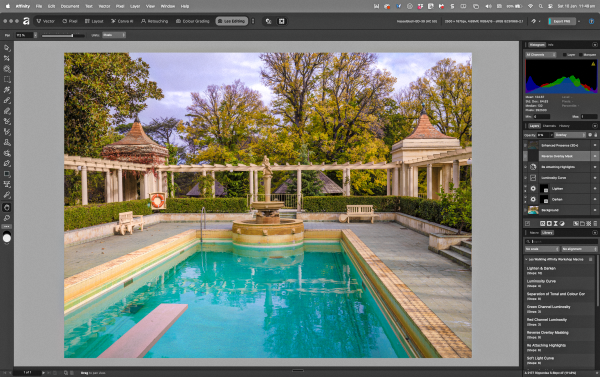
Affinity – Pixel Studio is ‘the Photoshop we always desired but have never had’ and is certainly worthy of serious consideration, whether you are wanting to add advanced image editing to your workflow, or transcend the practical and conceptual limitations of Lightroom and Capture One et al, or simply transition out of the ‘Adobe bubble’, let alone ‘get away’ from Photoshop’s challenging inconsistencies and vast contradictory ‘literature’, Affinity Photo offers a more enlightened, intuitive and sophisticated pathway without imaginative constraints or ongoing subscription payments. Consequently we investigate Affinity Photo as a compelling alternative to Adobe Photoshop with the aim of fast tracking your move away from Photoshop to Affinity and its integration and inspired image processing into your creative life and workflows.
The workshop is presented in six recorded sessions plus tutorials, and is supported through weekly Zoom Tutorials and extensive resources – Notes, Videos, Test Files, Affinity Macros, 3D LUTs, ICC Profiles – covering the following topics in a fully searchable database and accessed without restriction via the Workshop’s Resource Website.
Understanding Affinity
• Do I need Affinity?
• Where does Affinity fit into my workflow?
• Affinity vs Adobe Photoshop – what is gained, what is lost?
• Navigating Affinity without losing your way
• Integration with other applications
• Libraries and Cataloguing
Reasoning with Affinity
• Canvas – Image Layers – Pixel Layers – Alpha Layers – Vector Layers
• Pixel Layers – Selections and Adjustments
• Alpha Layers – Masking and Transparency
• Channels – Composite & Active, Spare Channels & Channel Operations
• Alpha versus Pixel Masking
• Colour Management and Exporting Images
Processing Affinity
• Develop: RAW processing and input camera profiles
• Pixel: Adjustment Layers and Live Filter Layers
• Pixel: Colour Models – Editing Hue, Saturation and Brightness
• Pixel: Exposure Stacking, Focus Stacking, Composition Stacking
• Liquify: Creative Distortion
• Tone Mapping: Dynamic Expansion & Compression
Editing Affinity
• Refining the Drawing Composition
• The famous five colour and density correction fundamentals
• Global Adjustments: Sliders, Curves, Blending Modes
• Local Adjustments: Selections, Masks, Nodes
• Masks: Copying to another Layer
• Masks: Applying to Grouped Adjustments
Compositing Affinity
• Stacking Images vs Placing Images
• Move Tool: Perspective Enhancements, Stretching, and Filling
• Blend Ranges: Interactive Masking
• Luminosity Masking, Hue Masking, Saturation Masking
• Cloning and Spotting: In Painting Brush, Healing, Batching
• Live Filter Enhancements
Refining Affinity
• Colour Curves: RGB vs. CMYK vs. LAB
• Tonal Curves: Grey vs. RGB vs. K vs. Ranges (0 -1)
• Sharpening: USM, High Pass, Clarity – Blending and Enhancing
• Substituting Luminosity and Advanced Blending Modes
• Macros and Presets
• Working with LUTs
The ‘Flipped Classroom’ facilitates a uniquely comprehensive yet individual learning experience where your creativity, knowledge and needs focus the inquiry, while your engagement and participation defines your outcomes. Our live-streamed Zoom Tutorials are designed to maximise our time together clarifying the course content and answering any follow-up questions and topics.
Venue: STREAMED On-Demand delivery
Duration: 10+ hours (workshop & tutorials)
Resources: Extensive course notes, videos, test images, actions, macros, luts
Cost: AUD $350 (includes all fees and charges)
More Information: See FAQ (Education)
Updated 04 March 2026