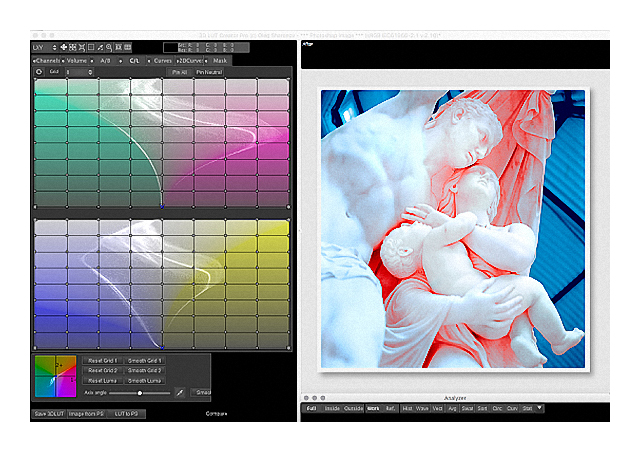
A brief video extract from the introduction of this workshop’s Why 3DLUT Creator? session.
STREAMED On-Demand Delivery
With Weekly Zoom Tutorials
This advanced workshop is attended via streamed on-demand delivery so the course material can be studied in your own time and at your own pace, while your practice and questions are subsequently addressed, clarified and supported in our weekly Zoom tutorials. The cost is AUD $350 including all fees and charges.
DETAILED MASTER CLASS OVERVIEW
This workshop provides a comprehensive introduction to 3D LUT Creator’s sophisticated yet surprisingly intuitive, and most importantly visually oriented image editing workflow. By first understanding pictures we distinguish what needs to be done from what can be done. This clarifies how other editing applications help or hinder our progress, what tools work as expected or don’t, and especially how 3D LUT Creator achieves so precisely and intuitively what other ‘industry leading’ software can’t. Through 3D LUT Creator we quickly resolve their most pressing issues and pictorial conundrums, and thereby evolve beyond their inherent colour editing and colour grading frustrations, limitations and ‘fatal flaws’.
Our Zoom Tutorials then focus 3D LUT Creator on ever more inspiring and inventive solutions, while quickly and efficiently resolving real world imaging problems, thereby also freeing up time, energy and focus that can be better devoted to your creative outcomes.
The workshop is presented in six recorded sessions plus tutorials, and is supported through weekly Zoom Tutorials and extensive resources – Notes, Videos, Test Files, LUTs – covering the following topics in a fully searchable database and accessed without restriction via the Workshop’s Resource Website.
Why 3D LUT Creator?
• What is missing in ‘industry leading’ workflows?
• Photoshop et al SWOT analysis
• Global vs. Local – selections vs. masks vs. nodes
• Gamma Encoding Errors
• What are Look Up Tables (LUTs)?
• Workflow Priorities – what do you need to achieve?
3D LUT Creator Colour Modelling
• Physics vs. Physiology
• The Psychology of Colour – appearance and sensation
• The Ontology of Colour – meaning and interpretation
• Colour Models vs. Colour Gamuts
• RGB vs. HSP vs. LAB colour models
• Colour Editing vs. Colour Grading
3D LUT Creator Fundamentals
• RGB and Non-RGB tool sets
• Nodes – Selecting, pinning, moving, and resetting
• Grids – A/B (Hue & Saturation)
• Grids – C/L (Saturation & Brightness)
• Curves – Non-RGB (Luminosity, Saturation & Brightness)
• Curves – RGBW vs. CMYK vs. 2D (CMY)
3D LUT Creator RGB Workflows
• Importing Images and Exporting LUTs
• Choosing the most appropriate RGB colour gamut
• Choosing the most appropriate colour model
• Choosing the most appropriate tools
• Preserving white, grey and black balance
• Channels (Colour) vs. Volume (Tonal) Compositions
3D LUT Creator Non-RGB Strategies
• Editing Brightness vs. Luminosity
• Editing Brightness independently of Hue and Saturation
• Editing Saturation independently of Brightness
• Editing Hue independently of Saturation
• Masking criteria and applications
• Matching reference colour palettes
3D LUT Creator Integration
• Workflow Design – components and collaborations
• Adobe Lightroom – 3D LUT Creator workflow
• Adobe Photoshop – 3D LUT Creator workflow
• Capture One – 3D LUT Creator workflow
• Affinity Photo – Neo Finder – 3D LUT Creator workflow
• Management & Conservation of colour appearance
The ‘Flipped Classroom’ facilitates a uniquely comprehensive yet individual learning experience where your creativity, knowledge and needs focus the inquiry, while your engagement and participation defines your outcomes. Our live-streamed Zoom Tutorials are designed to maximise our time together clarifying the course content and answering any follow-up questions and topics.
Venue: STREAMED On-Demand delivery
Duration: 10+ hours (workshop & tutorials)
Resources: Extensive course notes, videos, test images, actions, macros, luts
Cost: AUD $350 (includes all fees and charges)
More Information: See FAQ (Education)
Updated 04 March 2026